AI meeting notes that never leave your Mac.
Cachalot records, transcribes and summarizes your Zoom, Google Meet and Teams calls entirely on your Mac. No bot joins your call. No audio is ever uploaded. Your conversations stay yours.
Free to use · No account required · macOS 26+, Apple Silicon
Meeting bots are a privacy problem.
Most AI notetakers join your call as a visible bot and stream everyone’s voice to their servers. That makes clients uncomfortable, violates many companies’ policies, and puts confidential conversations in someone else’s cloud. Cachalot takes the opposite approach: everything happens locally, on hardware you own.
Everything a notetaker should do. Nothing it shouldn’t.
Built on Apple’s on-device speech and language models, plus Whisper for maximum accuracy.
No bots in your meetings
Captures system audio directly on your Mac. Nothing joins the call, no "recording bot" appears, and it works with any meeting app — Zoom, Meet, Teams, Webex, Slack huddles.
Exact speaker separation
Your microphone and the other participants are recorded on two separate channels, so "who said what" is structurally exact — not guessed by an algorithm.
On-device transcription
Choose Apple’s fast built-in engine, or Whisper large-v3-turbo for maximum accuracy. Both run entirely on your Mac, across about 100 spoken languages.
AI minutes, generated locally
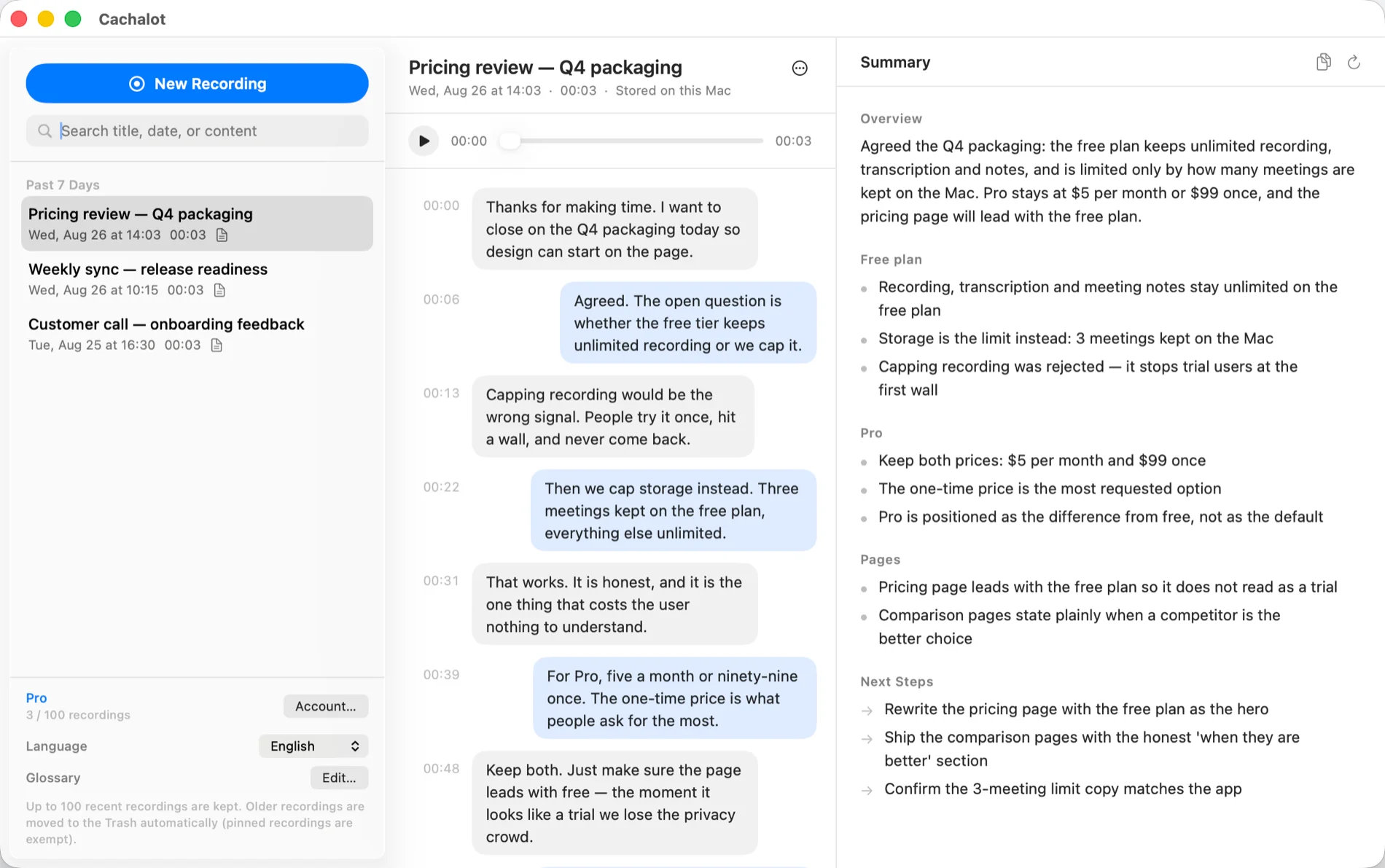
An on-device LLM turns the transcript into structured minutes: overview, topics, decisions and action items — ready seconds after you hang up.
Automatic meeting detection
Cachalot notices when a meeting app starts using your microphone and offers to record with a single click. Never forget to hit record again.
Private by architecture
Audio never leaves your Mac. Not "we promise not to look" — the app has no server to send it to. Recordings are plain files in your Documents folder.
How it works
Join your meeting as usual
When a meeting app starts using your mic, a small panel appears at the top of your screen. One click starts recording — or start manually from the menu bar.
Record and transcribe locally
Your voice and the other side are captured on separate channels and transcribed on-device, in the standard or high-accuracy Whisper mode.
Get your minutes instantly
Seconds after the call ends, structured minutes with decisions and action items are ready — saved as local files you fully own and can search, edit or delete.
Your conversations are not our product.
Cloud notetakers monetize access to your meetings. Cachalot is designed so that we couldn’t read them even if we wanted to.
Zero audio upload
Recording, transcription and summarization all run on your Mac’s Neural Engine. The only network access is a one-time, optional Whisper model download.
Works offline
On a plane, in a secure facility, on flaky Wi-Fi — everything keeps working, because nothing depends on a server.
Files you own
Recordings and transcripts are ordinary files in ~/Documents. Back them up, move them, or delete them — no vendor lock-in, no data retention policy to worry about.
Don’t take our word for it. Watch the network.
Every cloud notetaker asks you to trust a promise. Cachalot lets you check it. Point a network monitor at the app and record a real meeting — you will not find your audio leaving the machine, because there is no server on our side that could receive it.
Open a network monitor. Little Snitch, LuLu and Wireshark all work, and a trial is enough.
Record a meeting, let it transcribe, and generate the meeting notes.
Read the traffic. No audio, no transcript and no notes ever leave your Mac.
For the record, here is every time Cachalot does use the network: the one-time download of the high-accuracy speech model, the update check, the plan lookup if you buy Pro (it returns “free” or “pro”), and the anonymous usage statistics if you switch them on (event names and the week, never content). That is the complete list.
Frequently asked questions
Do other participants see a bot or get notified?
No. Cachalot records the audio playing on your own Mac, so nothing joins the meeting and no bot appears. You are responsible for complying with recording-consent laws in your region — we recommend letting participants know you’re recording.
Which meeting apps does it work with?
Any app that plays audio on your Mac: Zoom, Google Meet, Microsoft Teams, Webex, Slack huddles, Discord, and even browser-based calls. There is no per-app integration to configure.
Is it free?
Yes — recording, transcription and AI meeting notes are free, with no account and no time limit. The free plan keeps 3 meetings on your Mac; Pro ($5/month or $99 once) raises that to 100 and adds high-accuracy transcription and note templates. See Pricing for the details.
What are the system requirements?
An Apple Silicon Mac (M1 or later) running macOS 26 Tahoe or newer. The on-device AI models are the reason for these requirements.
How accurate is the transcription?
The standard mode uses Apple’s latest on-device speech engine and is fast and light. The high-accuracy mode uses Whisper large-v3-turbo, one of the strongest open speech models available, downloaded once (~1.6 GB) and then fully offline.
Where is my data stored?
In ~/Documents/Cachalot on your Mac, as ordinary audio and text files organized by date. Nothing is stored anywhere else.
Caches a lot. Shares nothing.
Like its namesake — the whale with the largest brain on Earth — Cachalot remembers everything and lets nothing escape. Download free and get private AI minutes from your very next call.
Get updates
New features, new languages, and the public roadmap. No spam, unsubscribe anytime.